Building a Smarter Advertising System: A Multi-Agent Architecture Guide
Overview
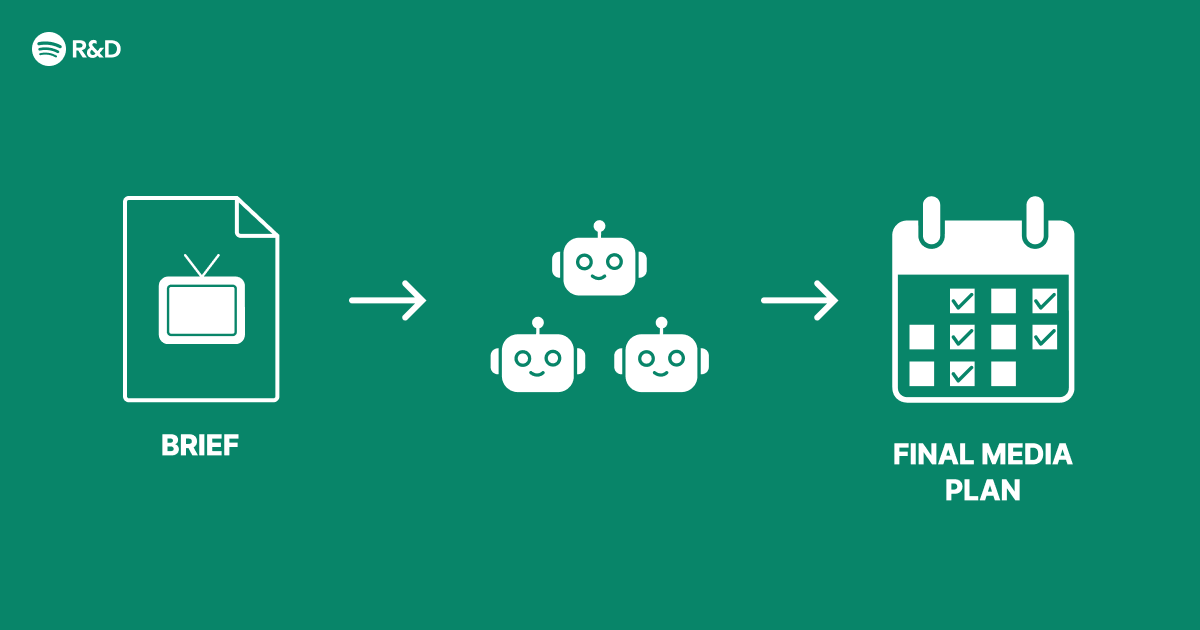
Modern advertising platforms face immense complexity: they must deliver relevant ads in real time, respect user privacy, optimize for multiple performance metrics, and adapt to dynamic market conditions. Traditional monolithic systems struggle to manage this. Inspired by Spotify Engineering’s approach, this guide walks through designing a multi-agent architecture that breaks down advertising tasks into specialized, cooperative agents. Each agent focuses on a core responsibility—such as target selection, creative generation, bid optimization, or budget pacing—while communicating through a shared context layer. The result is a modular, scalable, and smarter advertising system that can evolve with new requirements.
Prerequisites
Technical Background
- Familiarity with microservices and event-driven architectures
- Basic understanding of reinforcement learning (RL) and multi-agent systems
- Experience with Python or similar for prototyping
- Knowledge of advertising metrics (CTR, CVR, ROAS) and real-time bidding
Tools & Environment
- Python 3.8+ with packages:
ray,gym,numpy,pandas - Optional: Docker for containerizing agents
- A message broker like Redis or Kafka for inter‑agent communication
- Dataset: Sample ad impression logs (e.g., Criteo or Avazu) or a synthetic generator
Step-by-Step Instructions
1. Define the Agent Roles and Responsibilities
Identify the key decision points in an advertising pipeline. Common agents include:
- Targeting Agent: Selects the audience segment based on user profile and campaign goals.
- Creative Agent: Dynamically generates ad creatives (text, images) or chooses from a library.
- Bid Agent: Decides the bid price for each impression in real time.
- Budget Agent: Allocates daily budget across campaigns and time windows.
- Performance Monitor: Tracks metrics and feeds rewards back to the agents.
Define clear input/output contracts using structured data (e.g., JSON schemas).
2. Set Up Inter‑Agent Communication
Agents should not block each other. Use an event bus or message queue. Example with Redis:
import redis
r = redis.Redis(host='localhost', port=6379, db=0)
# Agent A publishes
r.publish('ad_requests', json.dumps({'user_id':'123', 'context':'...'}))
# Agent B subscribes
pubsub = r.pubsub()
pubsub.subscribe('ad_requests')
for msg in pubsub.listen():
    process(msg['data'])
For more robust patterns, adopt Apache Kafka with topic partitioning per agent type.
3. Implement a Simple Targeting Agent (Example)
This agent uses a rule‑based approach to start, later upgradeable to an RL model.
class TargetingAgent:
    def __init__(self, rules):
        self.rules = rules  # e.g., {'age': [18-35], 'interest': 'tech'}
    def select_segment(self, user_profile):
        for segment, criteria in self.rules.items():
            if all(user_profile.get(k) in v for k,v in criteria.items()):
                return segment
        return 'default'
Publish the segment decision to the creative and bid agents.
4. Build a Bid Agent with Reinforcement Learning
Use a simple Q‑learning approach. The state: remaining budget, time left, user segment, ad slot quality. The action: bid price (discrete buckets). Reward: success (impression + conversion) minus cost.
import numpy as np
class BidAgent:
    def __init__(self, actions, lr=0.1, discount=0.9):
        self.q_table = np.zeros((n_states, len(actions)))
        self.lr = lr
        self.discount = discount
    def act(self, state):
        if np.random.uniform(0,1) < epsilon:
            return np.random.choice(self.actions)
        else:
            return np.argmax(self.q_table[state])
    def learn(self, state, action, reward, next_state):
        target = reward + self.discount * np.max(self.q_table[next_state])
        self.q_table[state, action] += self.lr * (target - self.q_table[state, action])
Train the bid agent offline using logged impressions before deploying.
5. Orchestrate the Agents with a Coordinator
Create a lightweight orchestrator that manages the workflow per ad request:
- Receive incoming request (user context, available inventory).
- Invoke Targeting Agent → get segment.
- Invoke Creative Agent with segment → get creative.
- Invoke Bid Agent with segment + remaining budget → get bid price.
- Submit bid. On win, display creative.
- Log outcome and feed rewards to learning agents.
Orchestration can be a central service or use choreography via events. For example, after the targeting event, the creative agent automatically picks it up.

6. Integrate a Budget Pacing Agent
A budget agent uses a proportional‑integral (PI) controller to adjust spending rate:
class BudgetAgent:
    def __init__(self, total_budget, campaign_duration):
        self.remaining_budget = total_budget
        self.time_left = campaign_duration
        self.Kp = 0.1  # proportional gain
        self.Ki = 0.05
        self.integral = 0
    def pacing_multiplier(self, spent_so_far):
        error = (self.remaining_budget / self.time_left) - spent_so_far
        self.integral += error
        return max(0, min(1, self.Kp * error + self.Ki * self.integral))
Multiply the bid agent’s output by this factor to slow down when spending too fast.
7. Set Up Monitoring and Feedback Loops
Centralize metrics using prometheus_client and visualize with Grafana. Track per‑agent performance, request latency, and overall campaign ROI. Use the performance monitor agent to compute rewards and push them back to the RL agents via shared memory or a pub/sub channel.
8. Deploy and Scale
Containerize each agent with Docker. Use Kubernetes for orchestration and auto‑scaling. For high throughput, consider deploying multiple instances of the same agent behind a load balancer.
Common Mistakes
- Over‑engineering early: Start with simple rule‑based agents and hardcoded communication before introducing RL or complex messaging.
- Ignoring coupling: Tight coupling between agents (e.g., direct API calls) negates the benefits. Use asynchronous, event‑driven patterns.
- Synchronous waiting: If the bid agent blocks while learning, overall latency suffers. Separate training from inference.
- Neglecting budget constraints: A bid agent that optimizes individual impressions without considering global budget will overspend. Always include a pacing mechanism.
- Inconsistent reward functions: Ensure all agents optimise toward the same business objective (e.g., ROAS) and not conflicting sub‑goals.
- No fallback logic: If an agent fails, the system should degrade gracefully (e.g., use a default bid). Implement circuit breakers.
Summary
This guide presented a multi‑agent architecture for advertising, decomposing the problem into independent yet cooperative agents: targeting, creative generation, bidding, and budget pacing. By following the step‑by‑step implementation—from defining roles, setting up communication, to training RL agents and deploying—you can build a smarter ad system that scales and adapts. The approach mirrors Spotify Engineering’s philosophy: fix structural complexity with modularity. Start small, iterate, and let each agent sharpen its skill over time.
Related Articles
- Unlocking Community Wisdom: A Modernized Approach to Facebook Groups Search
- 10 Reasons Why System Tools Need a Design Revolution
- SteelSeries Arctis Nova Omni Dethrones Nova Pro Wireless as Brand's Top Headset
- Mastering the Art of Hand-Painted Couture: A Step-by-Step Guide Inspired by Emma Chamberlain's Met Gala Gown
- Why California's Social Media Ban Threatens Free Speech Online
- iPhone 18 Pro CAD Leak Hints at Smaller Dynamic Island—But Source Raises Doubts
- NVIDIA, Adobe and WPP Launch Secure Agentic AI Platform to Revolutionize Marketing at Scale
- Revolutionizing Facebook Groups Search: How AI Unlocks Community Knowledge