Conversational Ads Management: A Natural Language Interface for Spotify's Ads API with Claude Code Plugins
Introduction
Managing advertising campaigns on Spotify is a complex task that often involves navigating extensive API documentation and writing code to interact with the Spotify Ads API. But what if you could simply ask, in plain English, to adjust a budget, pause a campaign, or retrieve performance metrics? This vision is now a reality, thanks to a novel approach that leverages OpenAPI specifications, Markdown files, and Claude Code Plugins to create a natural language interface — all without writing a single line of compiled code.
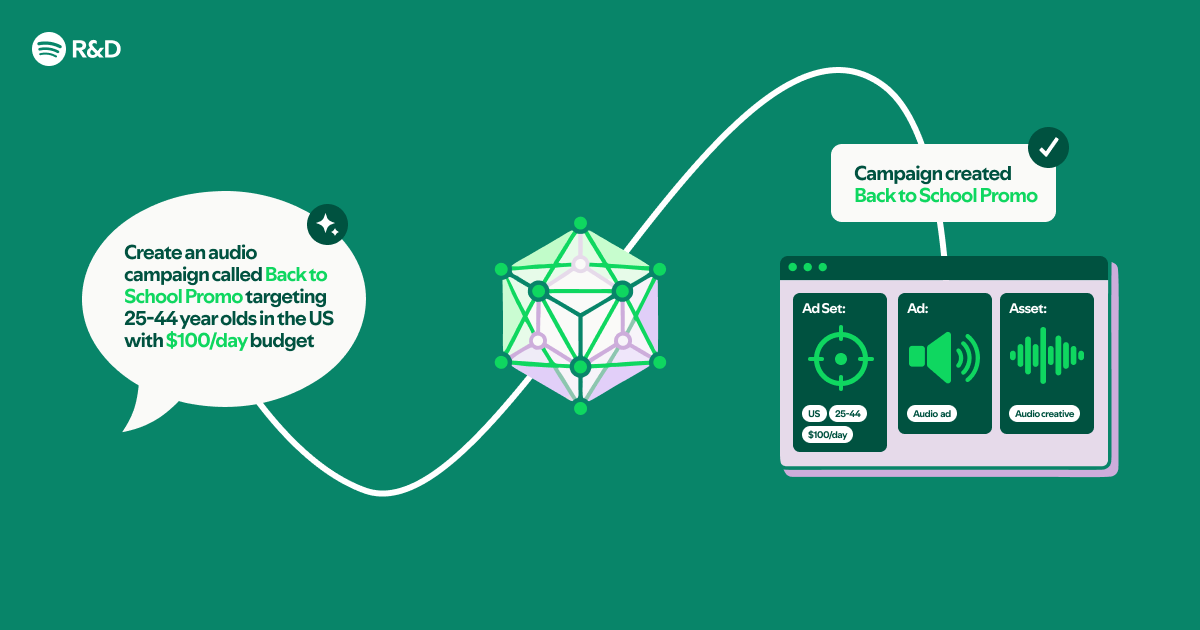
In this article, we explore how to transform an OpenAPI spec and Markdown documentation into a conversational ads management tool, diving into the building blocks, implementation workflow, and benefits of this innovative method.
Understanding the Building Blocks
The Role of OpenAPI Specifications
An OpenAPI Specification (formerly Swagger) is a standardized format for describing RESTful APIs. It defines endpoints, request parameters, response structures, and authentication methods in a machine-readable way. By feeding this spec into a conversational interface, we enable the system to understand the complete API surface — what actions are possible, what data they require, and what results they produce.
Spotify's Ads API is documented via OpenAPI, making it an ideal candidate for this approach. Instead of manually coding API calls, the spec becomes the knowledge base for the natural language system.
Leveraging Markdown for Documentation
Beyond the OpenAPI spec, supplementary documentation is often written in Markdown — for example, best practices, use cases, and frequently asked questions. These files contain rich human-readable context that a pure OpenAPI spec might lack. By including Markdown files in the knowledge base, the conversational interface gains the ability to answer broader questions like “How do I optimize targeting for a new album launch?” or “What are the minimum budget requirements?”
Integration with Claude Code Plugins
Claude Code Plugins extend the capabilities of Anthropic's Claude AI assistant, allowing it to read local files, call external APIs, and execute custom logic. In this project, the plugin is configured to:
- Load the OpenAPI spec (e.g.,
spotify-ads-api.yaml) and Markdown docs into context. - Parse natural language requests and map them to appropriate API actions.
- Construct and execute API calls using the plugin’s code execution feature — but without requiring the user to write any code themselves.
The beauty of this integration is that no compiled code is required. The entire interface is built on configuration files and the plugin’s runtime capabilities. This dramatically lowers the barrier for ad managers and marketers who may not have programming experience.
The No-Compiled-Code Approach
Traditionally, building a natural language interface to an API would involve developing a custom backend, training a machine learning model, or at least writing middleware code. Here, the approach is radically simpler:
- Prepare the files: Obtain the latest OpenAPI YAML/JSON spec and any relevant Markdown documentation.
- Configure the plugin: Write a short plugin manifest that tells Claude which files to load and what patterns to follow.
- Start conversing: The plugin interprets questions, looks up the spec, and performs API calls on demand.
This method works because Claude is already proficient in understanding JSON schemas, REST semantics, and natural language. The plugin simply bridges the gap between user intent and API execution.

Benefits for Ad Management
The conversational interface brings several advantages to Spotify ad campaign management:
- Speed: Instead of digging through documentation or writing code, users get instant answers and actions.
- Accessibility: Non-technical team members, such as marketing managers, can independently handle routine tasks.
- Reduced errors: The plugin validates requests against the spec, preventing malformed API calls.
- Easy updates: When the API changes, simply updated the OpenAPI file and the interface adapts automatically.
Implementation Workflow
Here is a typical step-by-step workflow to set up the conversational ads tool:
- Obtain the OpenAPI spec from Spotify's developer portal (or your organization’s API registry).
- Gather Markdown docs — internal guides, FAQ pages, or even Slack exports that contain domain knowledge.
- Create a Claude Code Plugin with a manifest file referencing the spec and docs.
- Test with sample queries, such as “What is the performance of my campaign named ‘Summer Hits’?” or “Increase the daily budget of campaign ID 12345 to $500.”
- Iterate by adding more Markdown context or refining the plugin’s instructions.
There is no need to compile or deploy a server — the plugin runs directly in Claude Code’s environment, making it ideal for rapid prototyping and iterative development.
Conclusion
Building a natural language interface to the Spotify Ads API using Claude Code Plugins is a powerful example of how AI assistants can democratize access to complex platforms. By leveraging OpenAPI specs and Markdown files, we create a conversational tool that requires zero compiled code and empowers marketers to manage ads conversationally. This approach not only saves time but also makes ad management more intuitive and inclusive.
As APIs continue to proliferate, expect to see more “spec-driven” conversational interfaces that let us talk to our tools as naturally as we talk to each other.
Related Articles
- Mastering Go's Source-Level Inliner: A Q&A Guide
- Go 1.26: Key Features and Changes Explained
- Microsoft Releases Earliest DOS Source Code to Public on 45th Anniversary
- 10 Reasons Your Next External DVD Writer Is the Last One You'll Ever Need
- 10 Insider Facts About the Python Security Response Team's New Era
- NVIDIA's Nemotron 3 Nano Omni: A Unified Multimodal Model for Next-Generation AI Agents
- Anthropic Scoops Up Stainless in Bid to Dominate Developer Tooling for AI Agents
- Apple Issues Urgent Warning: Mac Mini and Mac Studio Supplies to Remain Tight for Months Amid AI-Driven Demand Surge